Opened 11 years ago
Last modified 11 years ago
#2798 new defect (bug)
Redirection loop to homepage after installing bbPress 2.6 (admin lockout)
| Reported by: |
|
Owned by: | |
|---|---|---|---|
| Milestone: | 2.7 | Priority: | normal |
| Severity: | normal | Version: | trunk |
| Component: | General | Keywords: | reporter-feedback |
| Cc: |
Description
Hi,
After installing version alpha 2.6, I came accross the following bug.
At first, nothing was going on, as long as I kept logged in after the install. However, after I wanted to login in my admin panel after the initial installation 3 hours later, a problem emerged.
I found out that the bbPress 2.6 installation on my WP 4.2.1 platform results in a redirection loop to my homepage, locking myself (admin) continously out. The funny thing is that I am actually logged in. I can see that in the forum at the front end.
Platform details:
- WordPress Version:WP 4.2.1
- Web Server Info:Apache
- PHP Version:5.5.17
- WP Memory Limit:192 MB
- WP Max Upload Size:100 MB
- PHP Time Limit:120
- WP Debug Mode:Disabled
When I click on my backend tab in Chrome, which normally loads:
http://www.wordpress.spiritueleverlichting.nl/wp-login.php
I am redirected to the homepage, though I am actually logged in.
I have tried the following:
- deactivating all plugins, to no avail
- switching themes (to twenty-fifteen), to no avail
- asking support from Siteground, everything is set up correctly according to them
- clear all cache
Via FTP I change the bbPress folder name so I am able to access the backend. Once logged in, I change the folder name back to its original name.
What is interesting is that when I log out while bbPress activited, the following URL emerges after the log out:
And in my error log, I found the following script:
mod_hive matched URI – normal admin URL – with match 2, referer: – admin URL with redirection
Hopefully you find this info valueable :-)
Best regards,
Bark
Change History (4)
#2
 @
@
11 years ago
Hello,
Thanks for your reply. Well it makes sense what you say, I hadn't think about it :-)
I checked upon the keymaster role and I have it (in Dutch), see screenshot:

The errors were a temporary server downtime, that's what they said at SiteGround. If you check the pages again, you are able to access them (I hope). In addition, I activated the default 12-15 theme so as to rule out any conflicts between bbPress and my actual theme. That is why you will see that many shortcodes on pages.
I got the 2.6 alpha from bbPress download page, so no vague download portal download ;-)
Do you have any other ideas regarding possible bug fixes?
Best regards,
Bark
#3
@
11 years ago
Hi,
Well, I just wanted to rule out something, so I created a new user (administrator) with a keymaster role, to no avail.
However, by activating the toolbar in the frontend mode, I am able to access the dashboard by clicking on "Dashboard" after being forwarded to the homepage.
Of course, this is only a temp. solution and does not solve the problem.
Maybe this information helps :-)
Best regards,
Bark
#4
 @
@
11 years ago
- Keywords reporter-feedback added; needs-testing removed
- Milestone changed from 2.6 to 2.7
- Priority changed from high to normal
- Severity changed from major to normal
Any updates on this? Looks like the website is gone.
I'm moving these back down in priority until we can confirm we can duplicate this.
Bark,
The expected behaviour of bbPress out of the box is to not allow users access to
/wp-admin, we actually redirect back to the site home page, this should not be happening for the site administrator (bbPress role keymaster)When you visit http://www.wordpress.spiritueleverlichting.nl/wp-admin/users.php you should see your admin account and bbPress role:
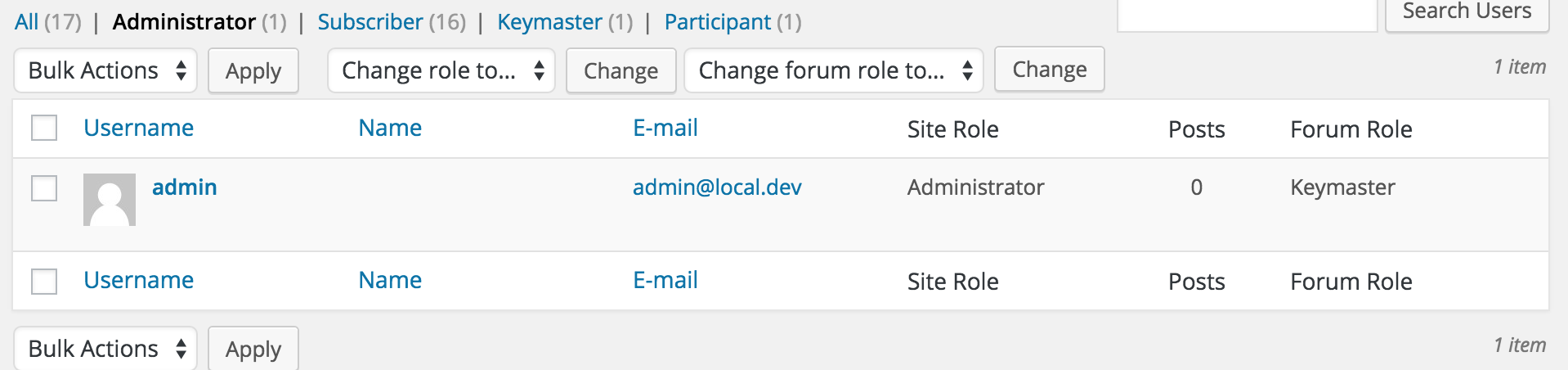
At the moment I cannot access the above or below URL's without getting any errors per the screenshots linked
Can I ask where you downloaded 2.6 alpha from?
(Here on bbPress Trac or via https://wordpress.org/plugins/bbpress/developers/)
For reference: A couple of screenshots via trying bbPress URL's on your site: